| Post applies to: | ||||
|---|---|---|---|---|
| SQL DB Singleton | SQL DB Managed Instance | Synapse (SQL DW) |
Reserved Capacity
The elastic nature of Azure services (the ability to hot scale horsepower and storage up and down) is one of its great advantages but often critical database environments need to be available 24/7/365.
In this scenario you can achieve significant discounts by committing upfront to run your Azure SQL DBs for 1 year (23% discount) or 3 years (36% discount).
This upfront commitment is called Reserved Capacity.

- Equivalent to Reserved Instances for VM servers but reserving PaaS database capacity rather than a complete VM hence the name variation to Reserved Capacity
- Reserved Capacity can be used with Singleton, Elastic Pool or Managed Instance flavours of Azure SQL DB as well as Azure SQL Data Warehouse
- Reserved Capacity is bought in 1 or 3 year chunks
- The “capacity” can either be paid for monthly or in a single up-front payment
- Monthly or up-front payments makes no difference to the amount of discount
- Paying up front can help organisations whose finance policies insist on treating IT expenditure as CAPEX and therefore object to regular subscription billing that has to be treated as REVEX
- It is a billing only tool
- Doesn’t place any kind of limit or quota on the Azure SQL DB
- When Reserved Capacity is fully allocated, brand new databases and extra capacity added to existing DBs are charged at PAYG pricing
- Reserved Capacity *doesn’t* require Software Assurance or an Enterprise Agreement
- Any Subscription include PAYG ones can take advantage of Reserved Capacity
- Only works with vCore pricing i.e. you buy a bunch of vCores not DTUs
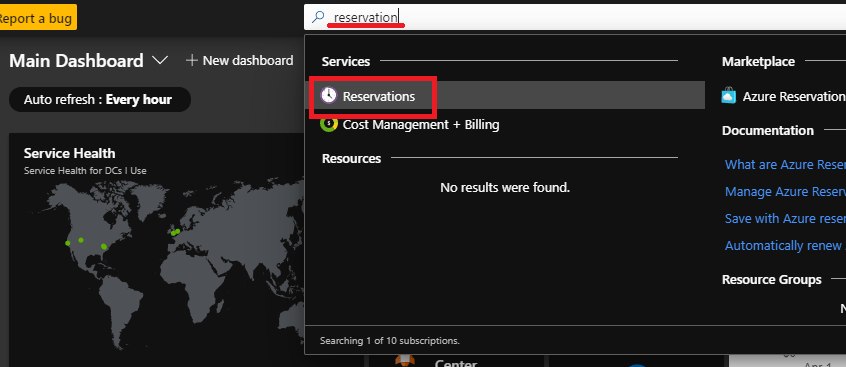
- Reserved Capacity is bought through Azure Portal – search for the “Reservations” service
- The same Reservation service is used to purchase & manage Reservations for Windows & Linux VMs (Reserved Instances), Azure SQL DB, Azure SQL Data Warehouse & Cosmos DB (Reserved Capacity) as well as other services
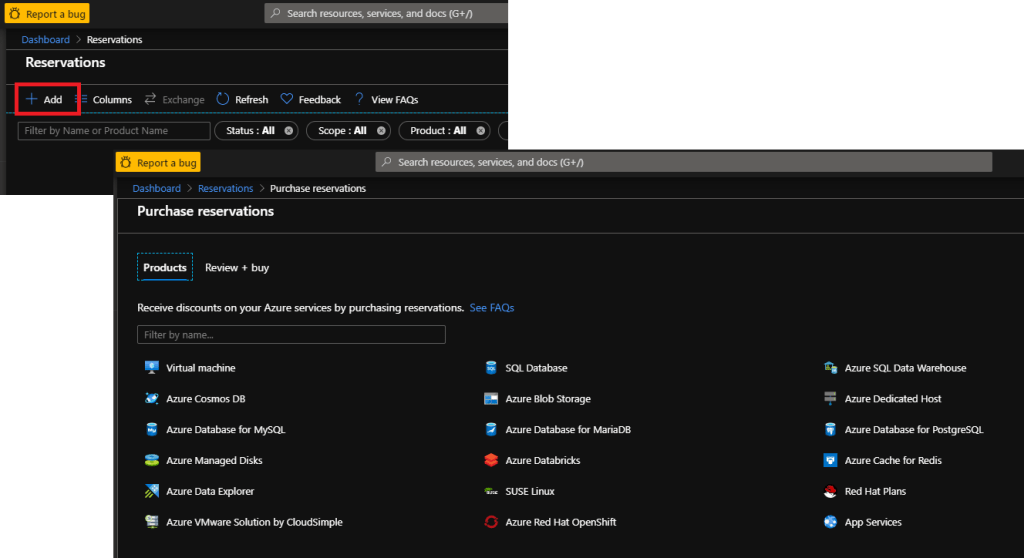
- Each Reserved Capacity “reservation” has a scope defined
- Subscription it belongs to
- Specific Region/DC
- Database type (Singleton, MI, etc)
- Performance tier
- Quantity of capacity
- Any DB matching the scope will automatically have the Reserved Capacity applied until the Quantity is used up
- Reserved Capacity is use it or lose it
- You can cancel your Reserved Capacity early and get a refund
- Refunds are limited to $50,000 in a single year
- Currently there are *no* penalty fees for cancellation but Microsoft warns it may introduce a 12% fee in the future
- Azure DB pricing page has some FAQs covering Reserved Capacity at the bottom of the page:
- Full doc here:
- https://docs.microsoft.com/en-gb/azure/sql-database/sql-database-reserved-capacity?toc=/azure/billing/TOC.json
- Doc only refers to Singleton & Elastic Pool but Managed Instance can be chosen in the reservation configuration
Dev/Test Pricing
Since SQL 2016 the Developer Edition has been a fee free license and you can get the same discount for your Azure SQL DB environments as well.
- Dev/Test licensing reduces the cost of your Azure SQL DBs by 55%
- The remaining 45% covers the cost of the (virtual) hardware – the compute (vCores & ram) and storage effectively stripping out the cost of the SQL license
- This is the same reduction as Azure Hybrid Benefit provides
- Dev/Test pricing is only available through a Visual Studio subscription
- Azure Dev/Test pricing with links to details for different services can be found here: https://azure.microsoft.com/en-us/pricing/dev-test/
- More detail on Azure DB Pricing page: https://azure.microsoft.com/en-us/pricing/details/sql-database/managed/
 After 20 years in data...
wow!! 44Azure SQL Network Security (Vnets, Service Endpoints & Private Link)
LikeLike